
In Qrtr Check Approval is the point where Qrtr's output stops being working material and becomes a record. Before it, everything is provisional and nothing can be emailed out. After it, the result is locked and can be distributed.
Approving a Qrtr Check report
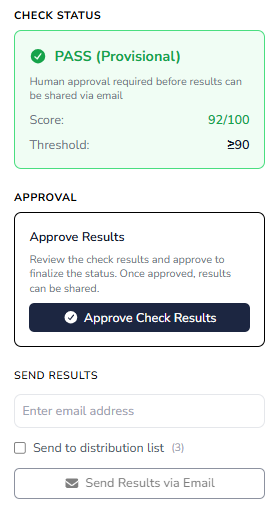
An unapproved report shows its outcome with a qualifier — PASS (Provisional) or FAIL (Provisional) — and the Check status card spells out the consequence: human approval is required before results can be shared by email. The card also shows the score and the threshold it was measured against, which is the comparison your decision should rest on.
Below it sits the Approval card, headed Approve Results, explaining that approving finalises the status so results can be shared, with the button Approve Check Results.
Before you press it, work through the issue list on the left rather than the headline number. The filters let you isolate Critical, Significant and Minor findings and separate Met from Not met requirements. While the report is provisional you can still reopen issues, mark them Does not apply and add comments — and those are the actions to take now, because once you approve, the report is locked and none of it can be revised.
The right-hand rail of a provisional report showing the PASS/FAIL (Provisional) status card with score and threshold, the Approve Results card, and the greyed-out Send Results via Email button beneath it. This one image explains the whole approval gate.
After approval
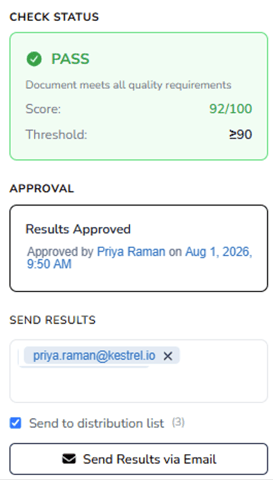
The provisional status is removed and the report now shows PASS or FAIL. The name of the Appover is recorded along with the time and date. The report can now be emailed to an email address that is entered and/or the pre-configured distribution list in the project quality profile.
When approvals stall
Approval is the most common bottleneck in the system. Insights shows a live count of blocked items with how long each has been waiting and offers Reassign and Send reminder on each. If you are consistently the longest queue, reassigning is better than letting work sit.