Document review re-engineered

Faster reviews, a clear record, and every lesson carried forward.

Review a reportCheck against requirementsProduce a deliverableLearn from every review
Structural reportLive Issue Register 3 open
5. Design loads
5.1  Loads have been derived from the 2024 site survey and the design standard that applies to each structure.
5.2  Peak demand has been taken as 4.2 MW based on the 2024 load survey. Allowance is made for staged growth to 2040.
5.3  Wind and seismic actions follow section 6 and are summarised in Appendix C.
§5.2 · Sarah Thompson
Peak demand conflicts with Appendix C. Reconcile before issue.
Change requiredCritical
§5.3 · David Park
Which wind region has been assumed?
QueryMinor
The problem

Your QA record is a marked-up Word file

Reviewers comment in a copy of the report. Authors fix what they can find. The copy is saved as the QA record, where nobody can search it, count it or learn from it.

  • Comments are locked in one saved copy.
  • Nobody can see whose desk a report is on.
  • A signature table is thin evidence when a client asks who checked what.
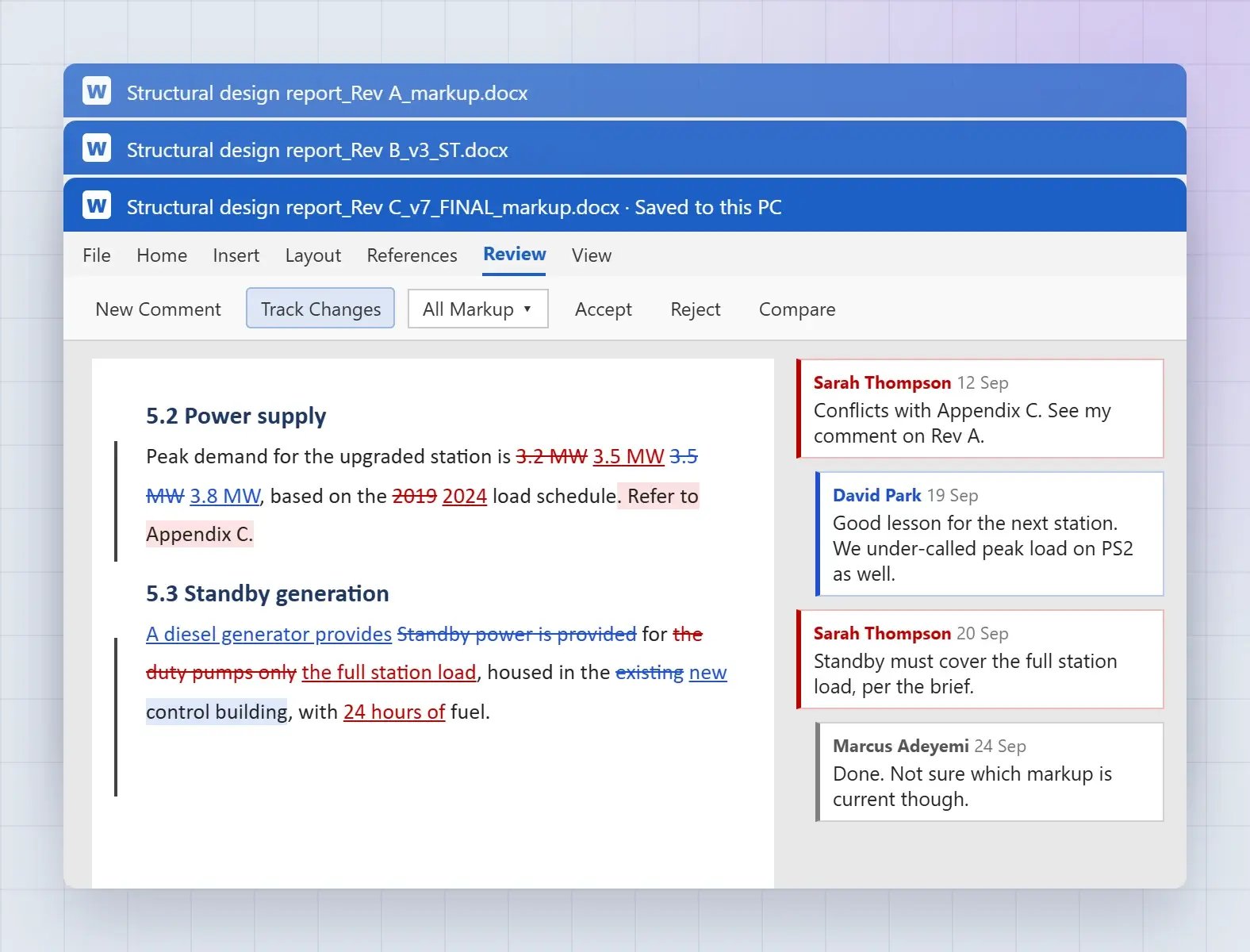
Three saved copies of the same Word report, each full of tracked changes and scattered reviewer comments.
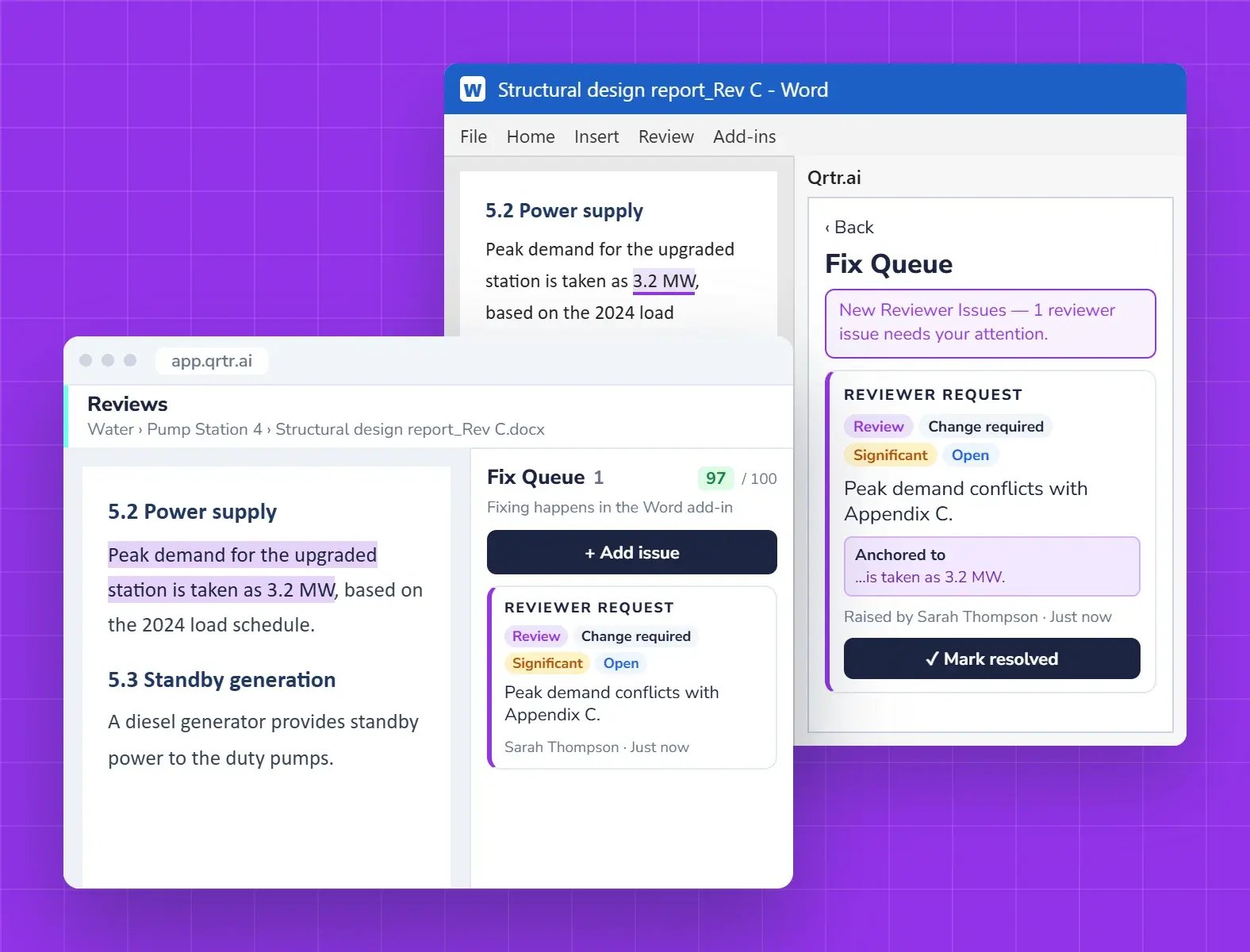
The same report open in Word with the Qrtr Fix Queue, and in the browser where a reviewer raises an issue on the matching passage.
WMicrosoft WordPDFPDF reports

Authors stay in Word. Reviewers open any report

Authors write and fix in Microsoft Word, with the Qrtr add-in’s Fix Queue beside the document. Reviewers work in the browser on a clean copy of a Word or PDF report.

  • Fix Queue in the Word add-in
  • Review Word and PDF reports
  • Export issues as PDF or CSV
Review together

Every reviewer, one list of issues

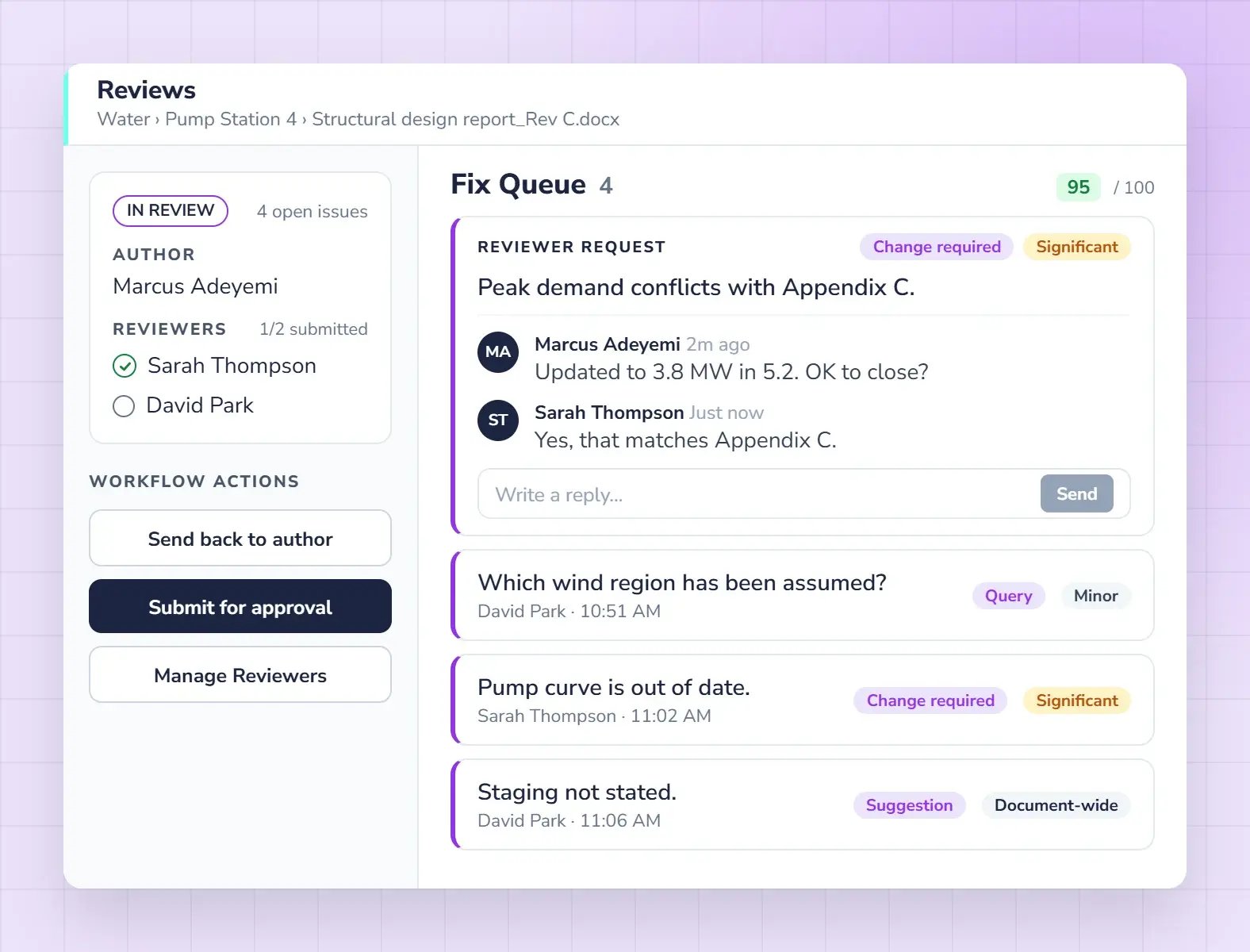
Multiple reviewers work on the same version at the same time, with visibility of each other’s findings. Each issue reaches the author as soon as it is raised, and the conversation stays on the issue.

  • Multiple reviewers on one version
  • Issues raised once, with type and severity
  • Conversations attached to each issue
The Qrtr review page listing issues from two reviewers, with one issue open to show the author and reviewer replying to each other.
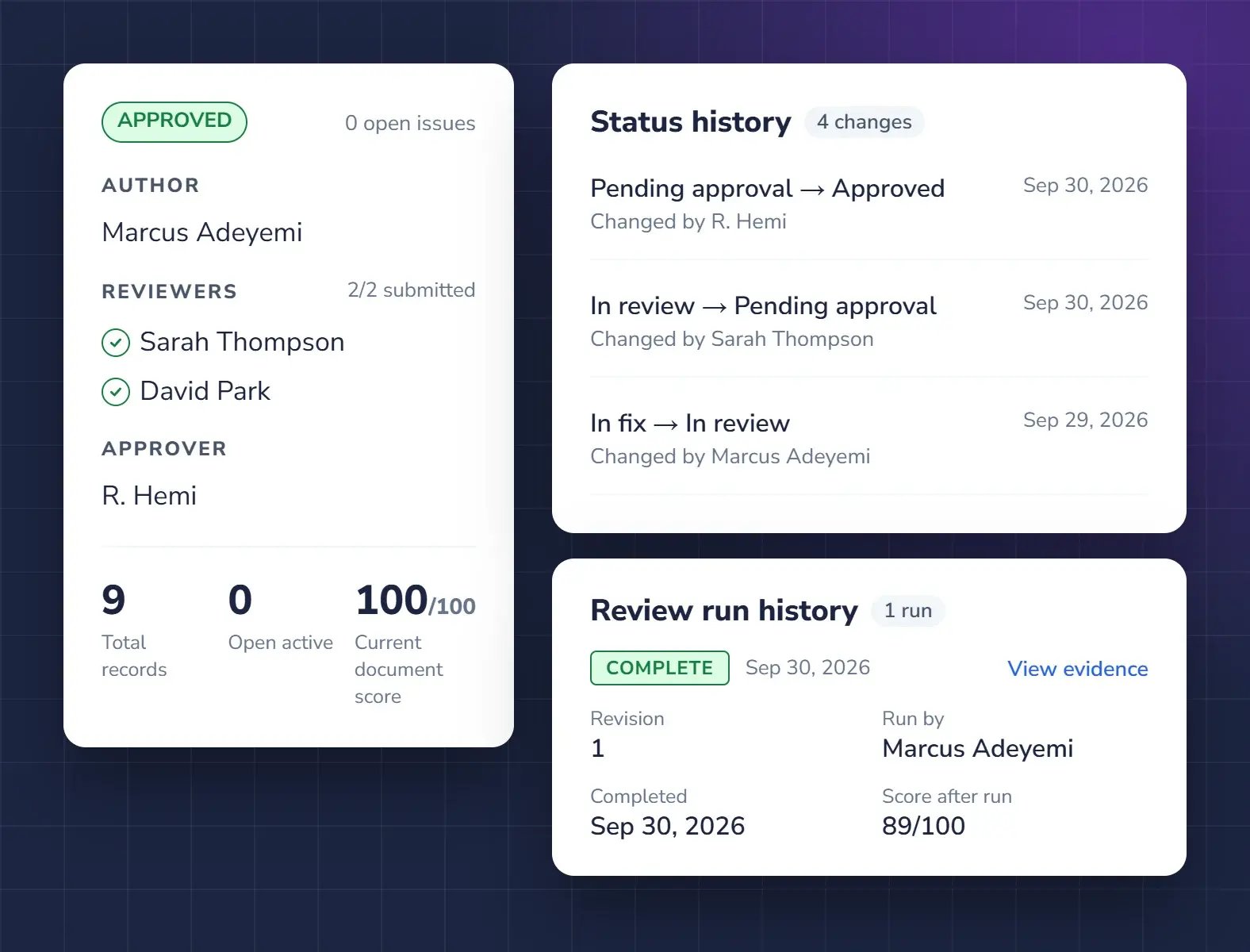
The Qrtr approval status for a report, with its author, two reviewers and approver, beside the Issue Register status history and review run history.
Sign-off

A record you can stand behind

When the approver signs off, a sign-off record and the full history stay with the report. Who reviewed it, what was raised, what changed and who approved it are all on the record.

  • Sign-off record stays with the report
  • Full audit trail across versions
  • Evidence for clients, insurers and auditors
Qrtr AI

Give reviewers a head start

Qrtr Check reads the brief and the report once the author is done and before a reviewer starts, and puts what it finds on the Live Issue Register with the evidence. Your reviewers decide what stands.

  • Met or Not met for every requirement
  • The passage each result rests on
  • Available as a gateway check on incoming documents
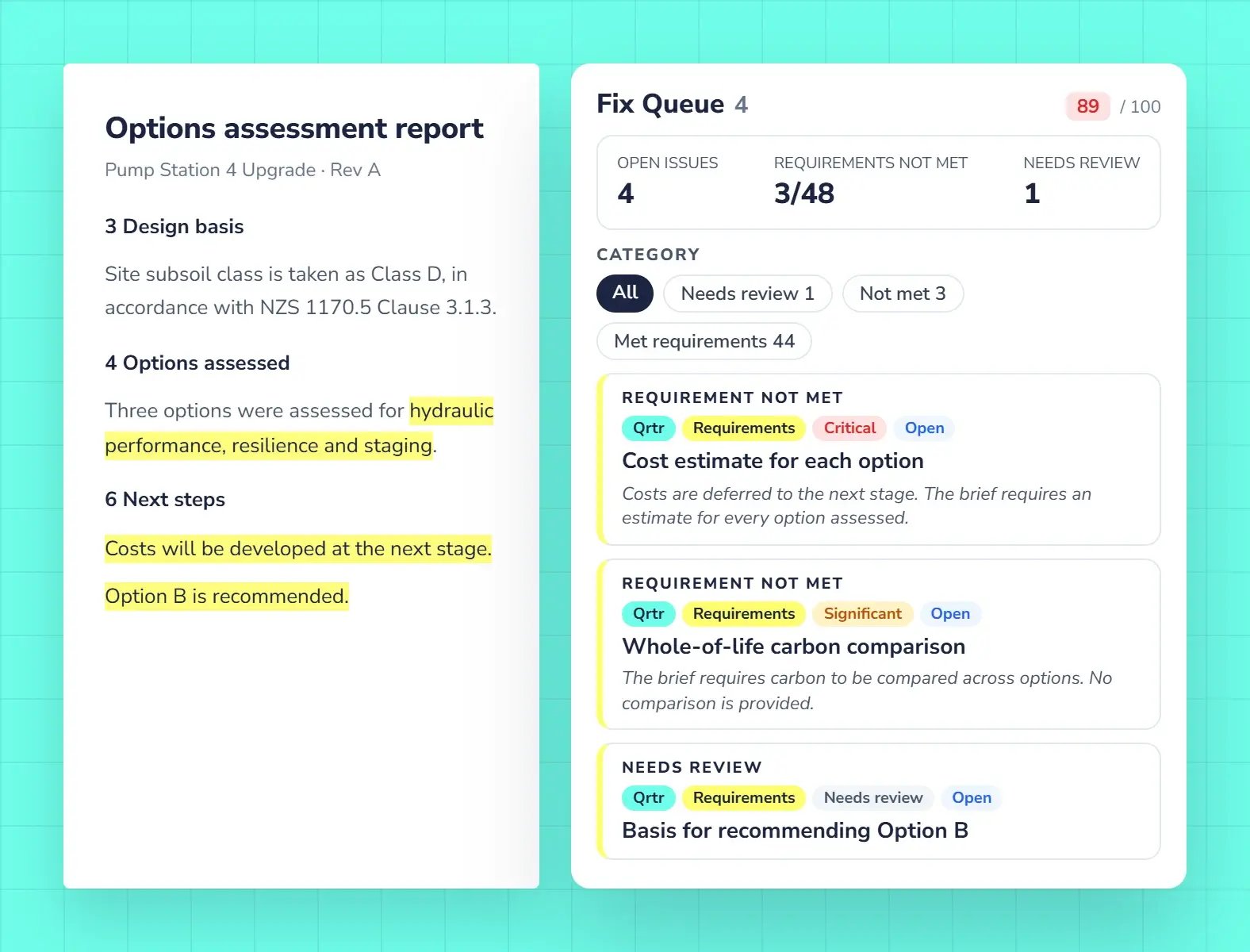
A report page with highlighted passages beside the Qrtr Fix Queue, showing 3 of 48 requirements not met, including a critical issue.
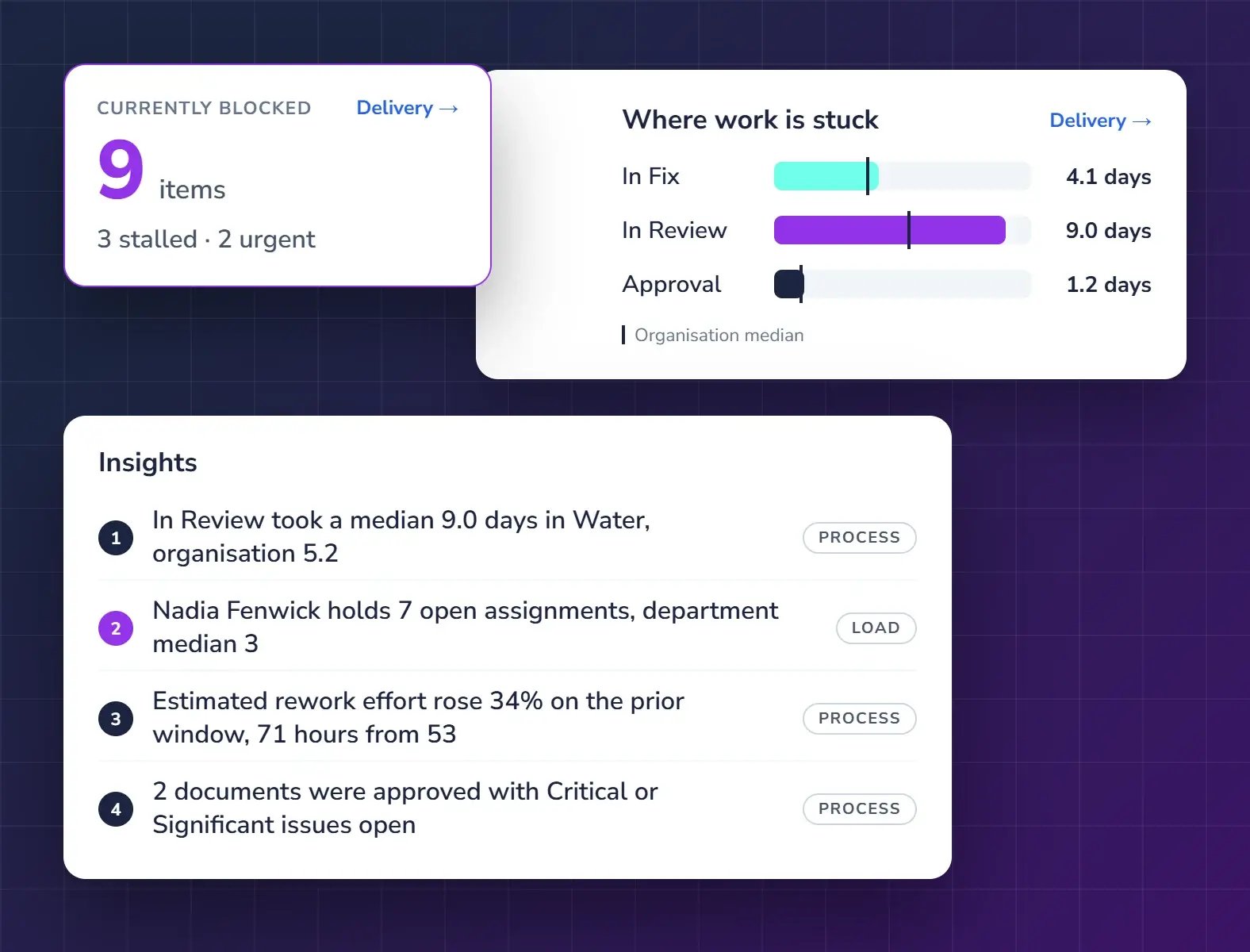
Qrtr Insights showing blocked items, where work is stuck by stage, and a list of findings for the department.
Insights

Learn from every review

See where time goes, where reports get stuck and where risk sits. Patterns across authors, reviewers and approvers point to the training and process changes that will pay off.

  • Bottlenecks and waiting time
  • Review load across the team
  • Training and improvement opportunities

Built for consultancies

Department and team leaders

See every report in progress across your teams, catch bottlenecks early, and give your risk committee a clean record.

Practice owners

Protect your firm's name on every report and free senior engineers for billable work, without adding headcount.

Senior and principal reviewers

Review faster on a clean copy, raise each issue once, and stop chasing whether it was fixed.

Pay for reviews, not seats

Unlimited users on every plan. Talk to us about the right plan for your team.

Request Demo

Questions about Qrtr

What is Qrtr?

Qrtr is a document review platform for consultancies. Reviewers review reports in the browser, authors fix issues in Microsoft Word through the Qrtr add-in, and every issue is tracked on one Live Issue Register from first draft to approval and sign-off.

How is Qrtr different from reviewing with tracked changes in Word?

Reviewers read a clean copy and raise each issue once, with a type and severity. Issues live on a register you can search and export, not in comment bubbles saved in a marked-up copy. Nothing disappears when changes are accepted.

Do authors have to stop using Word?

No. Authors write and fix in Word. The Qrtr add-in’s Fix Queue takes them to each issue in the document, and every fix syncs back to the Live Issue Register.

Can several reviewers review the same report at once?

Yes. Reviewers can work on the same version at the same time. Each issue reaches the author as soon as it is raised, and the conversation about it stays attached to the issue until it is closed.

Can I review a PDF report in Qrtr?

Yes. Qrtr reviews Word and PDF reports. If someone sends you a PDF, you can mark it up in the browser and export the issues as a PDF or CSV to send back.

How does Qrtr record sign-off?

The approver signs off in Qrtr, and a sign-off record is added to the report showing who reviewed it, what was raised and who approved it. Every action along the way is kept in the audit trail.

What do Qrtr Insights show?

Qrtr Insights show where review time goes, where reports get stuck and where risk sits. They track patterns for authors, reviewers and approvers, and show where training or process changes will help, by project, department or client.

Can Qrtr check a report against a client brief or requirements?

Yes, with Qrtr Check. It checks a report against a requirement set, such as a client brief, an audit protocol or a code of conduct, and marks each requirement Met or Not met with the passage it rests on.

Does AI replace human reviewers?

No. Qrtr Check gives authors and reviewers a head start, and its findings go on the register like any reviewer’s. People decide what stands, and the record shows who decided.

How much does Qrtr cost?

Plans are priced on the number of reviews, with unlimited users on every plan. Qrtr Check runs on credits. Request a demo and we will recommend the right plan for your team.

See Qrtr in action

A 30-minute walkthrough of how teams review, fix and sign off reports.